Sonos App Update Brings Back Tabs and Enhances Speaker Control


 See more Architeg Prints stories on Google.
Sonos App Update Brings Back Tabs and Enhances Speaker Control
Experience smoother speaker management and familiar tab navigation with the latest Sonos app update.
A Welcome Return: Tabs Are Back in Sonos App
If you’ve ever felt a pang of frustration navigating the Sonos app after its recent overhaul, you’re not alone. The latest Sonos mobile app update, version 87, is here to restore some much-loved features and add fresh tools for better speaker control. This update, labeled 87.00.36 for iOS and 87.00.35 for Android, is rolling out gradually, so expect to see it on your device within the next two weeks.
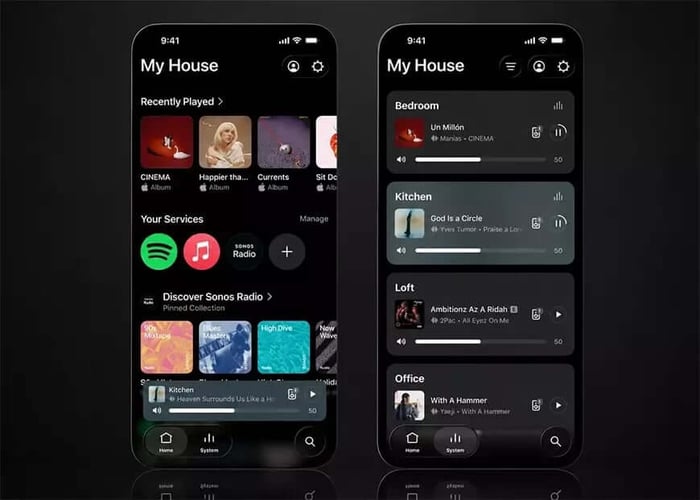
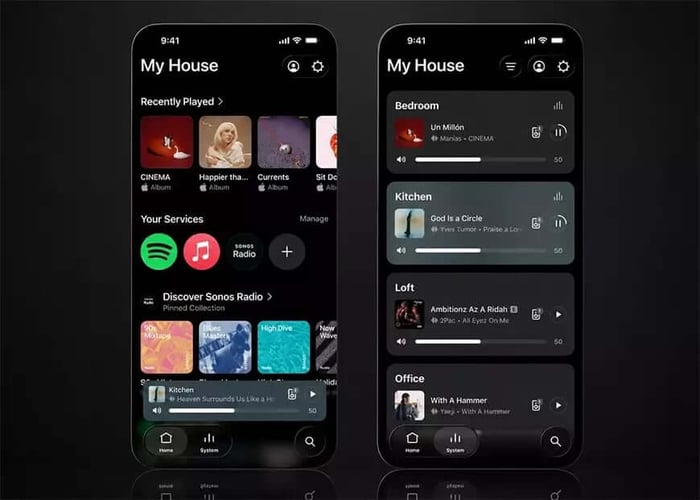
The refreshed Sonos app interface showcases the return of familiar tab navigation.
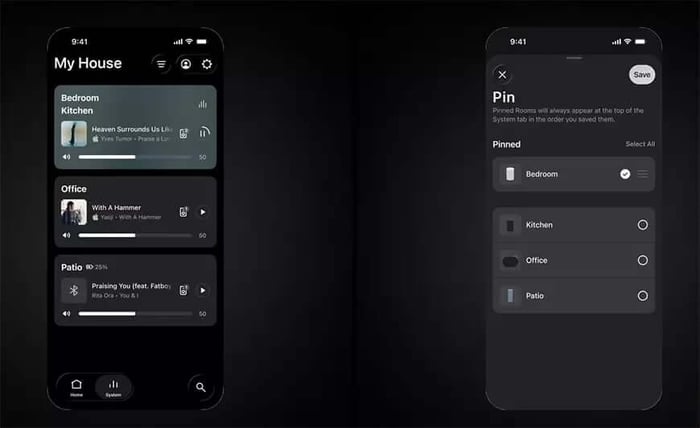
At the bottom of the app, you’ll now find a sleek panel with three clear sections: Home, System, and Search. The Home tab welcomes you with recently played tracks, favorites, and your connected music services. Meanwhile, the System tab gathers all available wireless speakers and groups in one place. And the Search tab? It’s your trusty companion for digging up music and revisiting previous searches. The best part? You can choose to toggle this new navigation on or off within the app settings — a nod to user preferences.
Streamlined Speaker Organization Made Simple
With tabs switched on, a treasure trove of new sorting options opens up for your speakers and groups. Whether you want to organize them alphabetically, by how often you use them, or by what’s currently playing, the app makes it easy. Plus, your favorite and most-used devices can be pinned right at the top of the System page for instant access.
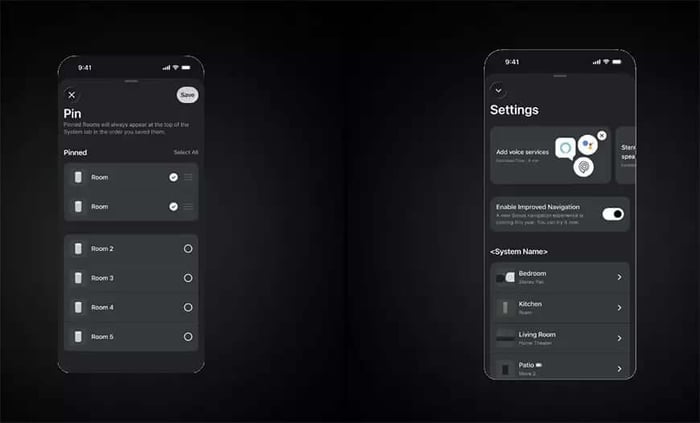
The app also smartly reconnects you to the last room or group you used, and if that device isn’t available, it quickly switches to an alternative. This kind of seamless experience can make all the difference when you just want to hit play and keep the music flowing.
iOS Users Get Dynamic Volume Control and Visual Flair
iOS fans are in for an extra treat with this update. The volume control slider has been reinvented to be dynamic — it can show the current signal level or even transform into a quick access button for the equalizer. Now, adjusting your music’s loudness is not only smoother but also visually engaging.

Speaking of visuals, the playback screen now automatically adapts its color scheme to match the album cover art of your current track. It’s a subtle touch, but it adds a layer of polish and personality to your listening sessions.
According to the developers, these tweaks are designed to make volume adjustments quicker and more responsive — something every music lover appreciates when mood strikes.
A Return to Roots: Listening to Fans
This update marks an important step in Sonos’ app journey to repair its reputation following a rocky redesign in May 2024. That earlier version frustrated many with missing familiar features, reduced stability, and more complicated system management.
Bringing back tab navigation and letting users choose whether to enable the new interface signals a clear shift in Sonos’ approach — putting simplicity and user feedback front and center.
“The return of tabs and the ability to voluntarily enable the new interface show that Sonos decided to focus on core functions and listen to the feedback from its device owners.”
— Sonos Development Team
For fans like myself, these changes feel like a breath of fresh air, blending the best of the old with exciting improvements.
FAQ
- How can I enable or disable the new tab navigation in the Sonos app?
You can toggle the tab navigation feature on or off in the app’s settings menu, giving you control over your preferred layout. - Will the update affect both iOS and Android devices?
Yes, the update is available for iOS (version 87.00.36) and Android (version 87.00.35), rolling out gradually to all users. - Can I organize my speakers into groups within the app?
Absolutely! The System tab allows you to see all wireless speakers and groups, with options to sort and pin your favorite devices. - What new features are exclusive to the iOS version?
iOS users get a revamped dynamic volume control slider and a playback screen that adapts its colors to the album art, enhancing both function and style. - Is this update aimed at fixing previous issues with the Sonos app?
Yes, this update aims to restore familiar functions and improve stability after the May 2024 redesign, focusing on user feedback to refine the experience.
Ready to celebrate your love for music and Sonos with some stunning visuals? Shop your favorite album cover posters at our store and bring those iconic tunes to life on your walls: Architeg Prints.
 | DISCOUNTGET 30% OFF*Use code on your next order:
|
* This post may contain affiliate links, meaning we earn a commission if you make a purchase through these links, at no additional cost to you.