Spotify and Android Auto Glitch: Where Have Your Favorite Songs Gone?



Spotify and Android Auto Glitch: Where Have Your Favorite Songs Gone?
Is your favorite concert live or rare demo suddenly missing on Android Auto? The Spotify glitch with local files is leaving users puzzled and frustrated.
When Your Playlist Plays Hide and Seek
Picture this: you're settling into your car, smartphone connected, ready to jam to that rare live concert or demo you carefully saved. You open your trusted playlist, but… nothing. Android Auto is suddenly ignoring your personal files, even though they play perfectly on your phone. What’s going on? Why does this once-smart system act like a moody gadget, making us miss the good old days of flash drives?
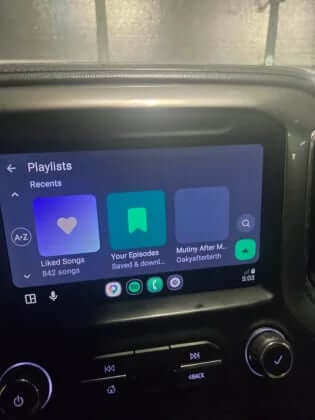
For fans who blend Spotify’s streaming library with their own local tracks, this glitch is a real headache. Increasingly, users report that songs stored right on their phones no longer appear in the Android Auto interface.
The whispers of trouble started bubbling up on Reddit, where one user shared how just weeks ago everything worked smoothly. Now, tracks physically saved on their phone have vanished from their car’s system. Interestingly, Spotify on the phone still sees and plays these files just fine—it's as if Android Auto pulls the plug once it takes control, hiding those precious tunes from your playlists. Fellow users chimed in, confirming they faced this issue across various phone models and car makes.
Album Covers Vanish Too: A Visual Mystery
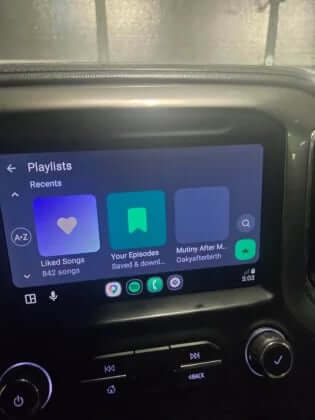
If missing songs weren’t enough, users noticed another oddity: album covers stopped showing up on the main Spotify screen within Android Auto. Curiously, the album art still appears in the smaller widget on the taskbar, but disappears on the main display.
This inconsistency suggests the problem lies deeper in the interaction between Spotify and Google’s system—far from a simple rendering glitch.
Despite users trying all the usual fixes—reinstalling Android Auto, clearing app caches, rebuilding playlists from scratch—no luck so far. While not widespread enough to declare a full-blown epidemic, those affected are left to wrestle with the bug on their own. Neither Spotify nor Google has offered any official comment.
Android Auto’s Rough Patch: More Than Just a Bug
The timing couldn’t be worse for Android Auto. Recently, owners of flagship phones like Galaxy S26 smartphone and Pixel smartphone have been battling constant connection drops. Some report the platform struggles to work reliably at all.
Add to that the steering wheel button malfunction introduced in the Android Auto 16.0 update earlier this year, and the picture looks grim.
It seems Android Auto is becoming the weak link in the Android ecosystem. Each major update brings fresh problems, with fixes trailing behind. Developers are working on useful features, like improving music autoplay, but what’s the point if core functions keep breaking down?
Who’s at Fault? And What Can You Do?
Right now, the blame game is a dead end. Is Spotify mismanaging metadata? Or is Android Auto filtering out local tracks when displaying playlists? Both companies remain tight-lipped.
For many, the ability to listen to personal files is a defining feature that sets Spotify apart from competitors. When this breaks in the car, it’s a serious reason to reconsider switching services.
Meanwhile, some users suggest temporary fixes, like switching to third-party Android Auto players that can access local storage directly, as a workaround until the bug is addressed.
Spotify and Android Auto Access: Pricing and Availability
Though Spotify isn’t officially available in some regions, fans continue subscribing through gift cards from other countries or joining family plans abroad. Subscription costs through intermediaries hover around $4–$8 per month.
Android Auto itself is integrated into nearly all modern smartphones and car multimedia systems shipped officially or imported through third-party channels.
Hardware Hiccups and Regional Challenges
In certain cars—especially some Chinese makes—Android Auto might be blocked or replaced by local alternatives. Owners often resort to wireless adapters to activate the system.
To keep Spotify playlists working properly, users sometimes have to change their account region settings. And if local files are giving trouble, trying other music players compatible with Android Auto can be a lifesaver.
The Algorithm Beats Ownership: A Digital Dilemma
Here lies the real paradox: even though we physically own files stored on our devices, we’re losing control over them. We buy or download music, keep it on our own phones, yet a third-party service decides if we can listen to it in our own car.
What’s shocking isn’t just the software bug, but the subtle form of “digital erasure.” Corporations have become so enamored with promoting cloud streaming and subscriptions that local files on your device feel like unwelcome guests.
This Spotify and Android Auto glitch exposes an uncomfortable truth: in today’s seamless interfaces, your personal data isn’t a priority—it’s a pesky roadblock to perfect streaming profit. We thought smartphones gave us freedom of choice, but in reality, they’ve become gatekeepers, ready to cut out anything that doesn’t fuel monthly streaming revenue.
“The local file issue is more than a bug—it’s a sign of how much control streaming platforms hold over our music libraries.” – A concerned user
Wrap-Up: Is Your Music Still Yours?
The missing local tracks and album art glitches have shaken many Spotify and Android Auto users, revealing cracks in a system once praised for its convenience. While the bug hasn't exploded into a full crisis, it’s a stark reminder that digital convenience can sometimes come at the cost of ownership and control.
Have you noticed your favorite personal tracks vanish on Android Auto? How do you cope when technology lets you down in the moments you just want to play your music?
FAQ
- Why are my local Spotify tracks disappearing on Android Auto?
It's likely due to a communication glitch between Spotify and Android Auto, causing local files to be hidden when accessed through the car system. - Can reinstalling Android Auto fix the issue?
Unfortunately, common fixes like reinstalling or clearing cache haven't resolved the problem for most users so far. - Are album covers supposed to show on Android Auto?
Yes, but currently some users report album art missing on the main screen although visible in widgets, suggesting a bug in the interface. - Is this Spotify and Android Auto problem widespread?
While not affecting everyone, enough users across different devices have reported the issue for it to be a significant annoyance. - What can I do to listen to local files in my car now?
Trying third-party music players compatible with Android Auto that access local storage directly can be a helpful temporary workaround.
Love the vibe of your favorite album cover? Brighten up your space by shopping for album cover posters at our store. It’s a perfect way to keep the music alive even when tech hiccups strike.
 | DISCOUNTGET 30% OFF*Use code on your next order:
|
* This post may contain affiliate links, meaning we earn a commission if you make a purchase through these links, at no additional cost to you.