AirPods Gain Custom EQ Control with iOS 27 Update


 See more Architeg Prints stories on Google.
AirPods Gain Custom EQ Control with iOS 27 Update
Unlock personalized sound with AirPods' new custom EQ in iOS 27—finally tweak your audio exactly the way you want it.
A Long-Awaited Sound Upgrade
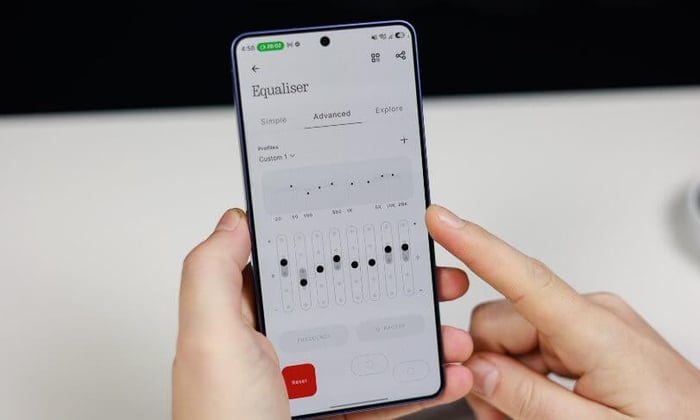
If you’ve been rocking AirPods headphones and dreaming of more control over your audio experience, the wait is finally over. Apple is rolling out a custom equalizer (EQ) feature in iOS 27 that hands the power back to you, letting you tailor your AirPods’ sound profile like never before.
For years, AirPods users have had to settle for Apple’s default sound tuning, which, while polished, hasn’t always suited every ear. With this new update, you can finally adjust bass, treble, and the overall tone to match your unique taste or the genre you’re vibing to. It’s a straightforward change, yet it feels like a breath of fresh air for music lovers who crave audio personalization.

AirPods 4 ANC paired with an iPhone, the perfect combo for audio customization.
Why This Matters: More Than Just Defaults
Until now, AirPods relied heavily on automated features to shape sound. Technologies like Adaptive Audio and Conversational Awareness smartly adjust volume and sound behavior depending on your environment or activity, but they don’t let you roll up your sleeves and tweak the EQ sliders yourself.
That’s where iOS 27 steps in, filling a gap that many fans have been loudly requesting. Some users have found Apple’s default AirPods sound a bit too bass-heavy or simply not fitting their ear preferences. Instead of Apple needing to create multiple versions of AirPods with different audio profiles, a customizable EQ lets everyone dial in the perfect sound, no matter their style.
Introducing the Custom EQ in iOS 27
Apple officially announced this feature during the WWDC 2027 keynote, promising the custom EQ alongside the release of iOS 27 and macOS 27 “Golden Gate.” It’s part of a broader push to give users more control and a richer experience across Apple devices.
However, there’s a slight catch: the custom EQ won’t be available right out of the gate. Like many new features, Apple plans to roll it out with the full public release of iOS 27 later this year, so patience is required.
Still, for those of us who have lived with preset sound signatures and longed for a personal touch, this update is a welcome game-changer.
Looking Ahead: What Custom EQ Means for AirPods Users
This update isn’t just about sound; it’s about empowerment. It transforms the AirPods experience from a one-size-fits-all approach to something truly customizable. Whether you favor booming bass for your hip-hop playlists or crisp highs for classical compositions, the control is in your hands now.
Think about all those moments when you wished your earbuds could sound just a little warmer or a bit brighter. Now, with iOS 27, you’ve got that power—no need for third-party apps or complicated hacks.
What tweaks will you make first when the custom EQ drops? Will you boost the bass, sharpen the treble, or create a whole new sonic landscape? Let us know your dream settings!
FAQ
- Can I use the custom EQ on all AirPods models?
The feature is supported on the AirPods lineup compatible with iOS 27, but check your device’s compatibility once the update rolls out. - Will the custom EQ affect battery life?
Adjusting the EQ settings has minimal impact on battery performance, so you can enjoy your personalized sound without worry. - Is the custom EQ easy to use?
Yes! Apple has designed it to be user-friendly, allowing quick adjustments directly within your iPhone’s settings. - Does this mean Apple will stop improving automatic sound features?
Not at all. The custom EQ complements existing features like Adaptive Audio, giving you even more options. - Can I save multiple EQ presets?
Details on preset saving haven’t been confirmed yet, but Apple may include options to save your favorite custom settings.
Ready to celebrate your love for music? Shop your favorite album cover posters at our store and bring the vibe of your tunes into your space: Architeg Prints.
 | DISCOUNTGET 30% OFF*Use code on your next order:
|
* This post may contain affiliate links, meaning we earn a commission if you make a purchase through these links, at no additional cost to you.