HyperX SoloCast 2 Review — Brilliant Sound Overshadowed by a Quirky Stand



HyperX SoloCast 2 Review — Brilliant Sound Overshadowed by a Quirky Stand
Affordable USB mic delivering crisp gaming audio, but its odd stand might leave you scratching your head.
Let’s be real: even budget gaming microphones can shoot your sound quality from ‘meh’ to crystal clear. You know what I mean — no more sounding like you're shouting from inside a tin can during those intense Discord chats. And the best news? There are fantastic options starting around just 60 bucks. No need to sell a kidney!
Enter the HyperX SoloCast 2. It’s not reinventing the wheel or blowing minds, but for the price, it’s surprisingly solid — seriously good, in fact.
What’s Under the Hood of the SoloCast 2?
This bad boy is a standalone USB gaming mic featuring a cardioid pickup pattern, meaning it captures sound primarily from the front, cutting out those annoying side noises. Inside, there’s a 14mm electret condenser capsule, boasting a studio-grade 24-bit / 96kHz recording quality — more than enough for streaming and Discord chats.
Compared to the original SoloCast, its specs didn’t stray far, but the design? Total glow-up. The construction now feels surprisingly sturdy, no longer a toy. They dropped in a handy built-in stand — just set it and forget it. And oh, that giant mute button on top? One tap and you’re instantly muted. Genius for those spontaneous “hold on a sec” moments.
All this goodness comes at around $60 (roughly $60 USD), available in sleek black — a total steal for the value.
Availability and Pricing Nuances
Currently, HyperX SoloCast 2 is officially available in select markets. HyperX markets it as a plug-and-play professional-level voice recording mic perfect for gaming and streaming. A little heads-up: the official model number is AR0A0AA, not to be confused with the older SoloCast version labeled 4P5P8AA. So, be cautious when buying — some shops might still list the previous generation as SoloCast 2 by mistake.
The manufacturer doesn’t list an official MSRP on their site, leaving prices to vary by retailer. At the time of writing, finding the SoloCast 2 in stock was tricky, hinting at possible shortages or delayed restocks. Warranty is a solid two years, but potential buyers should confirm the exact model number and availability with trusted sellers.
If you’re rocking Windows 10, note that HyperX’s NGENUITY software for fine-tuning the mic officially supports Windows 11 and above. Windows 10 users get access to an older version with limited features. And if your mic gets quieter over time, it might signal a defect — timely warranty service will be your friend.
Design That’s Both Sleek and… Unusual
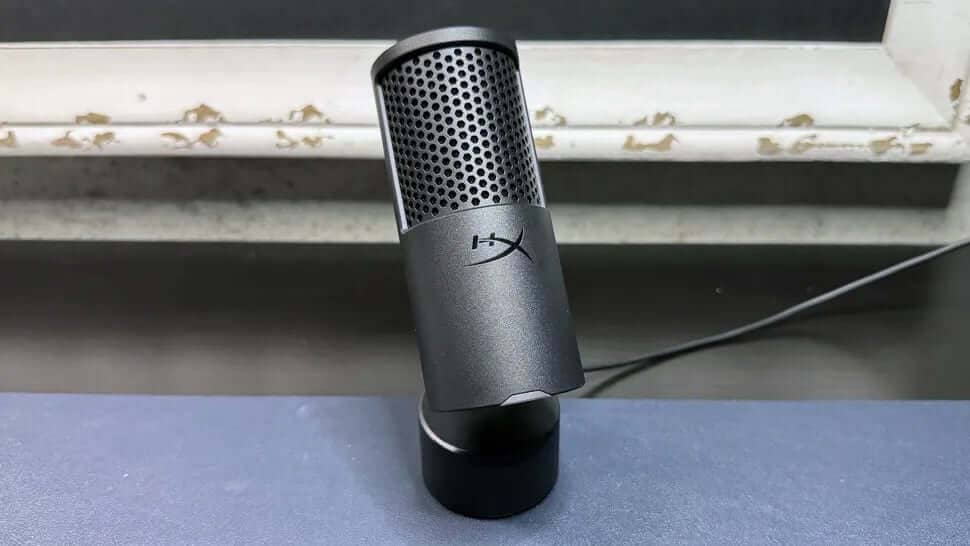
Stepping away from the classic condenser mic shape, SoloCast 2 sports a smooth, solid black cylinder with an integrated stand. The body is matte black plastic about 6 inches tall and 2 inches wide, topped with a matte black metal grille patterned in HyperX’s honeycomb style. Underneath, a foam pop filter and shock mount cradle the capsule to minimize vibration noise from your desk.
That built-in stand is unique but quirky. Hinging at the back, the mic tilts up to 40 degrees, aiming right at your mouth. The base is chunky and weighted at about 12.9 ounces, rubber-padded underneath so it won’t slip. Handy, but here’s the kicker — it makes the microphone sit pretty low on your desk, not ideal for that close-up “radio host” vibe we all crave.
The red LED indicator on the front shows whether it’s muted or active, but it’s a bit confusing — it glows red when the mic is on, which is the opposite of many gaming mics where red means muted. It’s a small design quirk that might trip you up initially.
A massive flat mute button dominates the top — seriously, one of my favorite features here. On the back, near the hinge, is a USB-C port for connectivity. The bottom sports a threaded hole compatible with 3/8” and 5/8” mounts, so you can ditch the stand and pop the mic on a boom arm or tripod if you like.
The box includes just a 2-meter USB-C to USB-A cable — no bells and whistles, keeping things simple.
How Does SoloCast 2 Perform?
Thanks to HyperX’s 2022 firmware update, SoloCast 2 records at 24-bit / 96kHz, same as its predecessor. Its cardioid pattern is perfect for solo users, focusing on your voice while cutting down background noise.
Plug-and-play at its best, it sounds pretty good right out of the box. Vocals come through full and warm, though not quite as pristine as the Logitech Yeti Orb, which edges it out in clarity. During my tests and streams, my voice had nice depth and detail with a pleasant proximity effect. But the built-in stand’s low profile meant I had to hunch a bit to hit that sweet spot.
The mic’s shock mount and pop filter are built-in but pretty basic. The mic easily picks up table vibrations and sharp sounds — definitely consider using a separate stand or boom arm to reduce noise from keyboard clacks and desk bumps.
Background noise? Yep, it catches quite a bit. While my computer fans never stopped spinning, my voice was still clear and upfront. HyperX’s Ngenuity Beta software has some handy AI noise suppression and EQ settings to clean things up. But they’re still a work in progress and have their quirks.
Specs You Should Know
| Feature | Specification |
| Capsule Type | 14mm Electret condenser |
| Frequency Response | 20Hz – 20,000Hz |
| Polar Pattern | Cardioid |
| Sensitivity | -7.8 ± 3 dB (1V/Pa at 1kHz) |
| Bit Depth / Sample Rate | 24-bit / 96kHz |
| Connectivity | USB-C |
| Gain Control | Software-based (via Ngenuity) |
| Software | HyperX Ngenuity Beta |
| Dimensions (HxD) | 6 x 2.08 in (152.4 x 53 mm) |
| Weight | 12.9 oz (365.7 g) |
| Launch Price | $59.99 |
| Release Date | August 2025 |
Software Features and Beta Status
HyperX’s Ngenuity Beta software is where you get to tweak the mic’s tone. You can adjust gain (since there’s no physical dial), toggle AI-powered noise reduction, and set high/low-pass filters.
The 10-band EQ is a neat touch, letting you create and save multiple custom presets. However, there are no built-in presets, so you start from scratch.
Bear in mind the software is still in beta. Settings don’t actually save to the mic or persist in the app after closing. You’ll need to re-enable your EQ or filters each time you launch it. Hopefully, this will improve with future updates, but there’s no official timeline yet.
Final Thoughts
SoloCast 2 doesn’t break new ground, but at $60, it’s a very competent mic. It’s a worthy sequel to HyperX’s original SoloCast, boasting a sturdier build and that essential mute button the first model lacked.
For comparison, the Logitech Yeti Orb also launched at a similar price, with a slight edge in sound quality. But SoloCast 2’s mute button is a clear winner for everyday convenience — Yeti Orb users must reach for software controls or go silent manually.
If you’re mostly gaming or chatting casually with friends and teammates, SoloCast 2’s simplicity and price make it an appealing pick — just keep in mind that red light means recording, not mute!
“For its price, SoloCast 2 offers a sturdy design and useful mute button, making it a great choice for casual gamers and streamers.”
FAQ
- What kind of microphone capsule does the SoloCast 2 use? It uses a 14mm electret condenser capsule with cardioid polar pattern ideal for capturing sound from the front.
- Can I use the SoloCast 2 with Windows 10? Yes, but the latest HyperX Ngenuity software with full features only supports Windows 11 and above. Windows 10 users will have limited functionality.
- Does the SoloCast 2 come with a boom arm? No, it only includes a built-in stand and a 2-meter USB-C to USB-A cable. However, it can be mounted on compatible boom arms or stands via threaded holes.
- Is the SoloCast 2 suitable for professional streaming? While it offers studio-quality recording specs and decent sound out of the box, its basic shock mounting and pop filter mean it’s better suited for casual or semi-professional streaming.
- What does the red LED light on the mic indicate? Unlike many mics, the SoloCast 2’s red LED means the mic is active (recording), not muted.
Ready to add some iconic flair to your gaming setup? Shop your favorite album cover posters at Architeg Prints and bring that pop culture vibe to your room while you stream!
 | DISCOUNTGET 30% OFF*Use code on your next order:
|
* This post may contain affiliate links, meaning we earn a commission if you make a purchase through these links, at no additional cost to you.