Klipsch ProMedia Lumina Review: Sleek Subwoofer, But Where’s the Bass?


 See more Architeg Prints stories on Google.
Klipsch ProMedia Lumina Review: Sleek Subwoofer, But Where’s the Bass?
Exploring the Klipsch ProMedia Lumina’s modern design with crisp mids and highs, but a disappointing bass performance for desktop audio lovers.
When Classic Meets Contemporary: A New Chapter for Klipsch ProMedia
Ever had that nostalgic feeling where classic gear just never gets old? I certainly have. There’s something comforting about trusting audio solutions that have stood the test of time. But what happens when a legendary brand like Klipsch decides to throw in a dash of modern flair and neon glow to its iconic ProMedia line?
Does the new Klipsch ProMedia Lumina retain that soulful sound we’ve cherished over decades, or is it all style over substance? Let’s dive into this sleek 2.1 system and find out if chasing fresh aesthetics sacrifices the bass your ears crave.
A Modern Makeover For A Revered Classic
The best computer speakers aren’t always the newest releases. For years, models like Logitech’s lineup have proven their staying power. Yet, even classics deserve to evolve with the times — blending vintage reliability with fresh tech.
Klipsch debuted its ProMedia computer audio series back in 1999 with the ProMedia v2-400, a THX-certified 4.1 system. Later, a 2.1 version followed, and despite some updates like Bluetooth support, the design stayed loyal to its roots until now. Enter the ProMedia Lumina 2.1, boasting a radically new look: a significantly slimmer subwoofer, angular satellite speakers, customizable lighting, and elegant wood-style vinyl finishes.
Priced around $380, it’s now available globally, with occasional discounts dropping it closer to $320.
Design That Commands Your Desktop
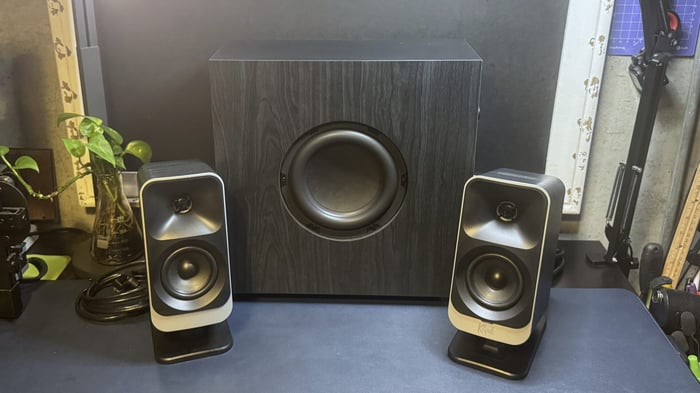
The ProMedia Lumina 2.1 immediately grabs attention by shedding its bulky predecessor’s shape. The satellites are large, rectangular with soft rounded edges, matte black speakers framed by a light silver trim. Covered in a black wood-textured vinyl, they look like they belong on a chic bookshelf, not shoved beside a monitor. However, I do worry about the durability of that vinyl — will it withstand years of use like the original ProMedia’s? Time will tell.
A Splash of Color: Subtle RGB Backlighting
Each satellite speaker’s back panel hosts a six-LED block roughly 76×64 mm, casting soft colored light on your wall. This ambient glow can be tweaked to match your desk’s vibe — a popular feature these days in gaming and computer audio setups. The speakers also have built-in plastic stands with rubber bases, tilting them back about 18 degrees for optimal sound projection — perfect for desktop placement.
Control Hub and Connectivity
The right satellite acts as the control center. Its top edge has three rubberized buttons: volume up, volume down, and a multifunction button. Honestly, these physical buttons feel a bit awkward to press, but luckily, you can also control everything via Klipsch’s smartphone or PC app.
The multifunction button powers the system on/off, toggles light brightness, or cycles through five preset lighting modes (including off). Around the back is a small rubber button to switch input sources between Bluetooth, AUX, USB-C, and headphones, with an LED indicator changing color to show the active connection.
An added bonus: the left speaker features a USB-C passthrough port to charge your phone or gadgets right from the speakers.
Speaker Components and Cable Setup
Each satellite packs a 1-inch mylar tweeter above a 3-inch midrange driver, connected with thick, 2-meter cables terminating in a proprietary DB9 connector to the subwoofer. While the cable length suffices for most desk setups, their thickness makes discreet cable management tricky, even with included clips on the subwoofer.
The Slim Subwoofer: A Bold Departure
The star of this redesign is the subwoofer. Gone is the large cubic block — replaced by a slim unit measuring about 14 x 14 x 6 inches and weighing just 11 pounds. Side-firing driver placement keeps it compact and elegant. The same wood-effect vinyl wraps its sides, topped with matte black plastic featuring a subtle glossy Klipsch logo.
Its rear panel hosts two DB9 ports for satellite connections, a USB-C port, 3.5mm AUX input, power socket, and a bass level knob.
What’s in the Box?
The package includes two satellites, the subwoofer, a 2-meter rubberized USB-C to USB-C cable, and a 2-meter power cable.
Technical Specs At A Glance
| Parameter | Value |
|---|---|
| Speaker Type | 2.1 |
| Drivers | 1" mylar tweeter, 3" midrange satellites, 6.5" side-firing subwoofer |
| Impedance | 8 Ohms |
| Frequency Response | 40 Hz – 20,000 Hz (-6 dB) |
| Signal-to-Noise Ratio (SNR) | 98 dB |
| Inputs | USB-C, 3.5 mm AUX, Bluetooth 5.3 |
| Cables | 2 m USB-C to USB-C |
| Satellite Dimensions | 9.7 x 6.5 x 4 inches |
| Subwoofer Dimensions | 14 x 14 x 6 inches |
| Weight | 2.1 lbs (satellites), 11 lbs (subwoofer) |
| Lighting | Yes |
| Software | Klipsch Control app |
| MSRP | $380 |
Sound Performance: Crisp Mids But Bass Falls Flat
The ProMedia Lumina sounds great on paper: beautifully balanced mids and highs. Tracks like K-391’s “Lonely World” shine with clarity and depth. High frequencies remain clean without harshness – even Britney Spears’ “Toxic” stays pleasant and clear. This makes the system perfect for gamers, delivering crisp positional audio cues like footsteps and gunshots without ear-splitting shrills.
However, the bass is the system’s Achilles’ heel. The subwoofer emits sound, but it’s thin and disappointingly weak. Even cranking volume and bass knobs to max can’t summon that satisfying thump you expect from a 2.1 setup, especially when the RGB lighting screams “gaming rig.” The satellites’ strong mid-low range somewhat compensate, but honestly, it sometimes feels like the subwoofer is just for show. The proprietary DB9 connectors also mean you cannot easily swap in a beefier subwoofer from another brand.
Multiple Ways to Control Your Sound
You can operate the system via:
- Physical buttons on the right satellite
- Klipsch Remote mobile app
- Klipsch Control desktop software
The app offers modest tweaks to lighting presets, including a fun “screen reaction” mode syncing lights to your monitor’s colors. It also houses:
- Virtual surround sound
- 6-band equalizer with presets
- Night mode (halves bass output)
- Sleep timer and system sounds control
If you want RGB that pulses perfectly to game audio, though, look at brands like Razer Nommo V2 Pro.
Availability and User Experience
The Klipsch ProMedia Lumina is widely available and mainly draws fans loyal to the Klipsch brand or those wanting a stylish desktop setup with tasteful RGB accents. For many apartment dwellers, the gentler bass works in their favor—avoiding noise complaints from neighbors while still providing decent sound for everyday media.
Potential Issues Over Time
The biggest concern isn’t audio quality but build and serviceability. Proprietary DB9 cables connect satellites to the subwoofer, so if a cable or speaker fails, you’ll need official replacements or professional service—upgrades or DIY fixes aren’t straightforward.
The vinyl wood finish, while elegant, may wear down with heavy use, especially if you move the system often.
Software-wise, some users report occasional USB-C quirks like limited bit-depth support and occasional firmware update challenges. These aren’t widespread but present minor annoyances.
Tips to Boost Your Bass Experience
While you can’t fully fix the weak bass due to the system’s closed design, here are a few tricks that improve it slightly:
- Position the subwoofer closer to a wall or corner to amplify perceived bass.
- Use the 6-band EQ and bass level controls in the app to find a sound that feels richer.
That said, for blockbuster movies or bass-heavy games, nothing beats a physically larger subwoofer.
Should You Buy the Klipsch ProMedia Lumina?
In summary, is it worth chasing the modern shine?
Pros:
- Crystal-clear vocals and detailed highs
- Stylish wood-effect design with subtle RGB lighting
- Compact, slim subwoofer that saves desk space
- Multiple input options including Bluetooth 5.3 and USB-C
Cons:
- Disappointingly weak bass for a 2.1 system
- Proprietary cables limit upgrade options
- Questionable vinyl finish durability
- Pricey for what you get at nearly $400
If you cherish clean sound without booming lows, want a sleek desktop centerpiece, and can overlook the premium price, Lumina could be your vibe. But if you crave powerful bass for games and movies, better to consider a solid 2.0 system paired with a separate subwoofer.
“Despite the elegant redesign and vibrant mids and highs, the bass left me wondering if the subwoofer was more for show than substance.”
— Audio Enthusiast Review
FAQ
- What inputs does the Klipsch ProMedia Lumina support?
USB-C, 3.5mm AUX, and Bluetooth 5.3 are all available for flexible connectivity. - Can I replace the subwoofer with a more powerful one?
Unfortunately, no. The proprietary DB9 connectors prevent easy swapping with other subs. - How does the lighting system work?
Each satellite has six LEDs that cast ambient light on the wall, adjustable via physical buttons or the Klipsch app. - Is the vinyl finish durable?
It looks elegant but may wear with heavy handling or frequent moving. - Does the system support software equalizer adjustments?
Yes, through the Klipsch Control app, you get a 6-band EQ and sound presets.
If you’re inspired by this review to bring classic audio style with a modern twist to your own space, why not shop for your favorite album cover poster at our store? It’s a perfect way to complement the vibe of your new sound setup. Shop now at Architeg Prints.
 | DISCOUNTGET 30% OFF*Use code on your next order:
|
* This post may contain affiliate links, meaning we earn a commission if you make a purchase through these links, at no additional cost to you.