New JPLAY Update Adds HQPlayer Library Support, Smart Playlists & History Screen



New JPLAY Update Adds HQPlayer Library Support, Smart Playlists & History Screen
Elevate your listening experience with JPLAY’s new HQPlayer support, dynamic smart playlists, and a sleek history screen for seamless music discovery.
A Fresh Spin on Your Music Library
If you're an audiophile or just someone who loves diving deep into their music collection, the latest JPLAY app update is something to get excited about. Rolling out in April 2026, this update brings several major features that fans have been eagerly awaiting. From integrating the powerful HQPlayer library to smarter playlist management and an all-new history screen, JPLAY is raising the bar for hi-fi streaming apps.
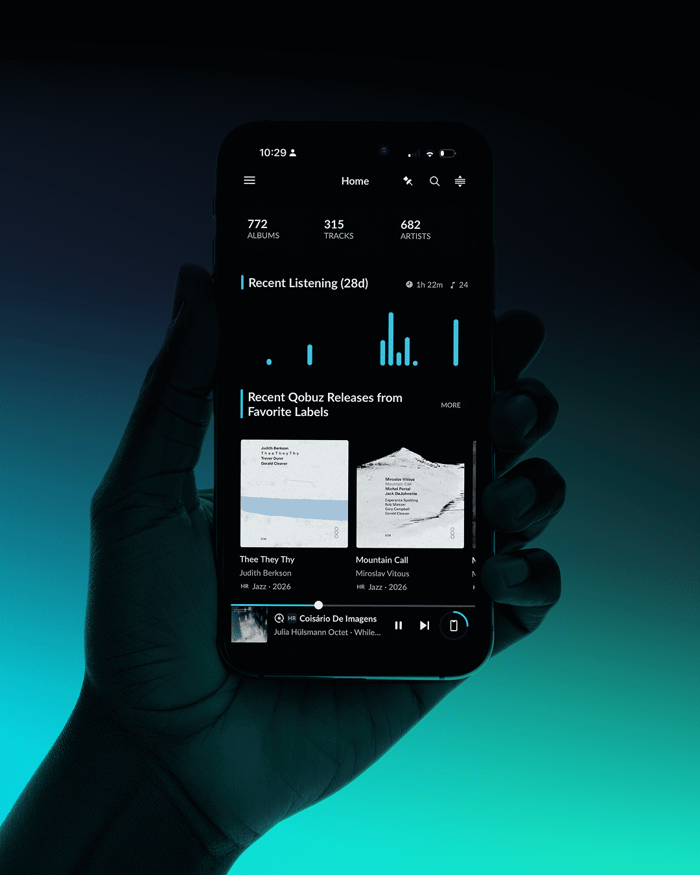
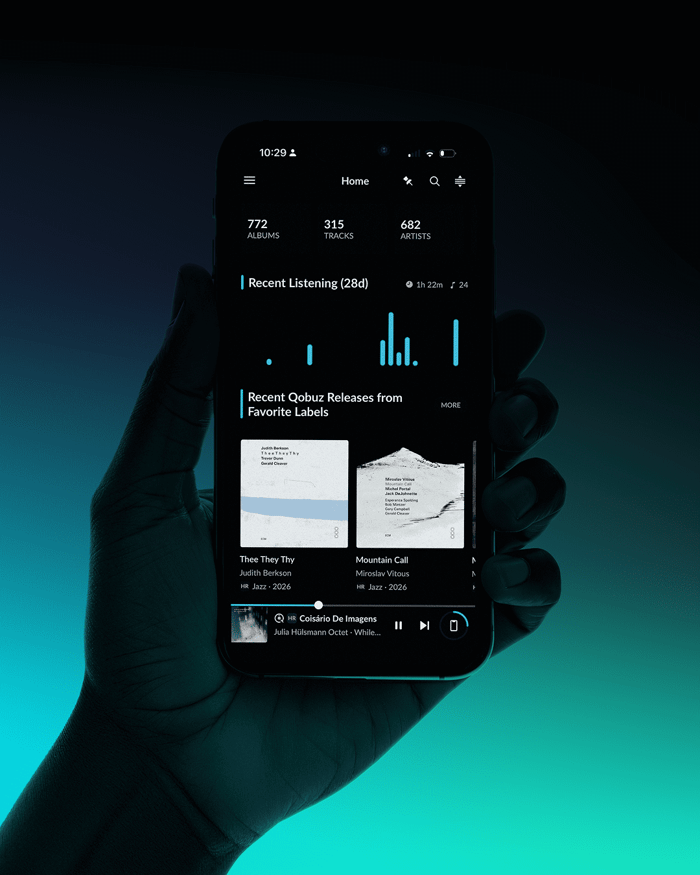
New JPLAY screen highlights library browsing and playback options.
HQPlayer Library Support: Audiophile Dream Integration
One of the crown jewels of this update is the full integration with HQPlayer’s library. For those who use HQPlayer Embedded or HQPlayer Desktop, this means you can now browse, control, and play your HQPlayer music collection right from the sleek JPLAY interface. Imagine blending JPLAY’s elegant and refined UI with HQPlayer’s renowned upsampling and DSP power — pure magic for your ears.
This integration also simplifies your setup. No longer do HQPlayer users need a separate local UPnP server; JPLAY handles the heavy lifting and delivers a fast, fluid browsing experience that feels right at home on any iOS device.
History Screen: Your Musical Time Machine
Ever wish you could effortlessly revisit that perfect track you played last month? JPLAY’s brand-new History screen makes that a breeze. Organized by day, your listening sessions are mapped out in a calendar view where brighter dots signal your most immersive musical days. It’s like having a visual diary of your sonic adventures.
Access the History screen through the side menu or tap the handy “Recent Listening” widget on the Home screen to jump back in with just one tap. This feature makes rediscovery effortless, helping you find those hidden gems or morning playlists you loved.
Smart Playlists: Let the Music Curate Itself
Sometimes, you don’t want to fuss with creating playlists — you just want the right tunes to flow. Enter Smart Playlists: dynamic lists that JPLAY builds automatically based on filters you set. Whether you want to explore music by genre, audio quality, release year, or specific libraries, Smart Playlists curate tracks that match your vibe without lifting a finger.
It’s a perfect tool for those days when inspiration is low but your appetite for good music isn’t. Just set your preferences and let JPLAY do the rest.
What Makes JPLAY Shine?
If you're wondering what sets JPLAY apart from other hi-fi music apps, it’s a combination of speed, sound quality, and user-centric design. The app connects effortlessly to nearly every streamer and network DAC on the market without needing a core device, streamlining your setup and freeing you from technical headaches.
JPLAY supports popular streaming services like Qobuz, Tidal, HIGHRESAUDIO, HQPlayer, and local files from UPnP servers — all accessible in one unified library or separately, based on your preference. Its lightning-fast context search and smart radio features make discovering new favorites a joyful breeze.
But perhaps the most thrilling part is its extreme optimization and native iOS programming, which guarantees smooth, responsive control unlike any other app out there. JPLAY also minimizes network traffic between the app and your audio endpoint, reducing network noise and elevating sound purity.
Designed By Audiophiles, For Audiophiles
The love behind JPLAY is palpable. The app was crafted by music lovers and audiophiles who understand the obsession with sound quality. It offers a classic folder view for those who prefer old-school browsing, continuously displays music quality and source, and shows exactly which artist is playing.
“JPLAY for iOS is easily the best control point app I’ve used to date.”
— Chris Connaker, founder of Audiophile Style
You can grab JPLAY on the App Store, compatible with iPhones, iPads, and Macs equipped with M CPUs.
JPLAY Certified Partners & Pricing
To guarantee a flawless user experience, JPLAY collaborates with selected manufacturers through its Certified program. Devices that pass tests for stability, compatibility, and performance earn the JPLAY Certified badge, ensuring seamless integration and top-tier sound quality.
When it comes to pricing, JPLAY offers:
- Yearly Subscription: $49 for full feature access and updates throughout the year.
- Two-Week Free Trial: Perfect for audiophiles wanting to test the waters.
- Lifetime License: $199, with a special $149 upgrade price for current subscribers.
Your Next Step in Hi-Fi Streaming
Whether you’re a seasoned audiophile or just stepping into the world of high-quality music streaming, JPLAY’s latest update makes it easier and more enjoyable to immerse yourself in sound. The fusion of HQPlayer library support, dynamic playlists, and an interactive history feature all wrapped in a blazing fast app reminds you why we love music so much.
FAQ
- How does JPLAY integrate with HQPlayer?
It allows you to browse, control, and play your HQPlayer library directly within the JPLAY app, eliminating the need for separate UPnP servers. - Can I revisit past listening sessions easily?
Yes! The new History screen organizes tracks by day with a calendar view that highlights your most active listening days. - What are Smart Playlists?
They’re automatically generated playlists based on your filters like genre, year, or audio quality, so you get personalized listening without manual playlist creation. - What devices does JPLAY support?
JPLAY works on iPhone, iPad, and Macs equipped with M CPUs, connecting with most streamers and network DACs. - Is there a free trial available?
Yes, JPLAY offers a two-week free trial so you can explore all its features risk-free.
Ready to bring your favorite album covers to life on your walls? Shop stunning album cover posters that complement your music passion at our store here. Surround your listening space with art as vibrant as your playlists.
 | DISCOUNTGET 30% OFF*Use code on your next order:
|
* This post may contain affiliate links, meaning we earn a commission if you make a purchase through these links, at no additional cost to you.