Why Your Old AirPods Are Outclassed by the Pro Version: 5 Reasons to Upgrade Today


 See more Architeg Prints stories on Google.
Why Your Old AirPods Pro Are Outclassed by the Pro Version: 5 Reasons to Upgrade Today
If you’re still holding onto those classic AirPods, here’s why the AirPods Pro models blow them out of the water with comfort, features, and sound quality.
Alright, I’ll admit it—I’m a proud iPhone user and a bit of an Apple fangirl. Over the years, I’ve owned a couple of pairs of AirPods Pro 2 and AirPods Pro 3. One pair chills at home, the other accompanies me to the gym. Meanwhile, my original AirPods lie forgotten somewhere in a drawer, practically gathering dust. Why? Because the Pro series simply redefined what wireless earbuds should feel and sound like.
Let me walk you through the five standout features that make the AirPods Pro my go-to choice—and why your old AirPods just can’t keep up.
1. Design That Finally Fits Like a Dream
Before I got my hands on the AirPods Pro, I was stuck with the standard AirPods. And honestly? The design always bugged me. The hard plastic felt uncomfortable, and the one-size-fits-all approach never quite worked for my ears. They’d constantly slip out, especially when I was breaking a sweat.
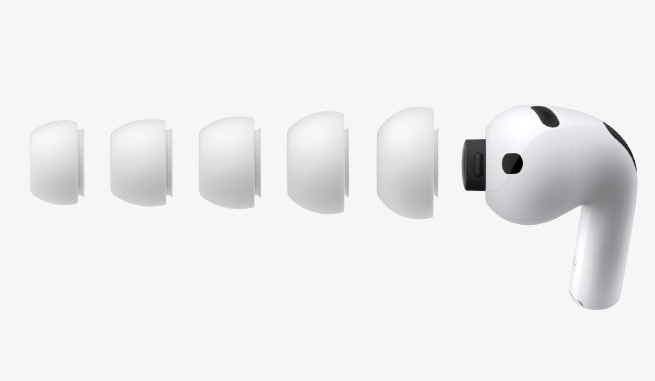
Now, the AirPods Pro come with an in-ear design that’s a total game changer. Pick the right ear tips, and these things stay put snugly, whether I’m running, lounging, or commuting.
AirPods Pro models come with different sizes of silicone ear tips:
- Pro 1: Three sets
- Pro 2: Four sets
- Pro 3: Five sets (from tiny to extra large)
And if you lose them? No fret—you can easily grab replacements from Apple.
2. A Smart Fit Test to Find Your Perfect Pair
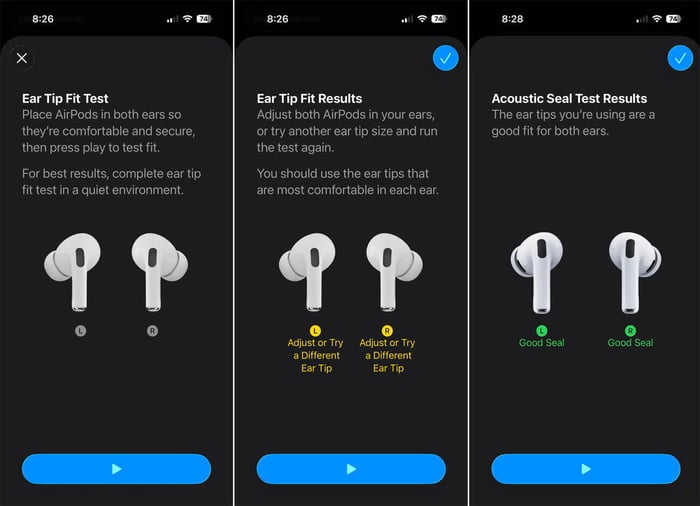
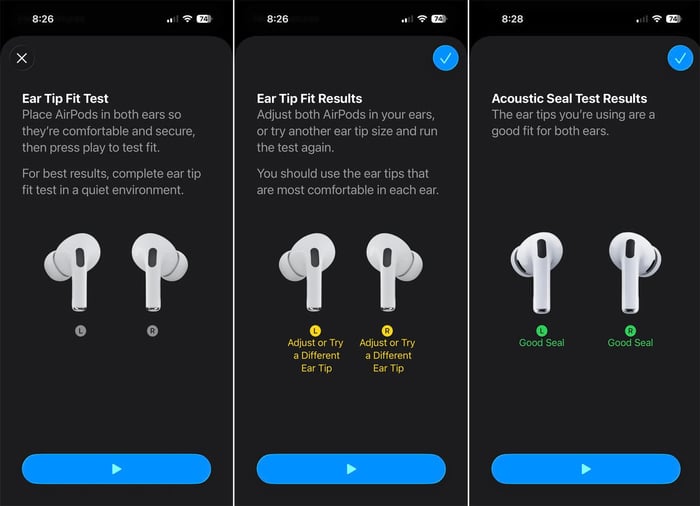
Here’s a neat trick Apple built right into the AirPods Pro: a fit test. This handy feature checks whether the ear tips are sealing your ear canal properly to deliver the best sound.
How it works:
- Swap out your current ear tips.
- Pop the AirPods Pro into your ears.
- On your iPhone, go to Settings > Bluetooth, tap the "i" next to your AirPods, then scroll to Ear Tip Fit Test.
- Follow the prompts and play the test sound.
If you get that green "Good Seal" check, congrats! You’ve found your match. If not, time to try another tip size. For me, the largest tips did the trick perfectly.
3. Volume Control Right at Your Fingertips
Think controlling volume means digging out your phone? Nope. AirPods Pro lets you swipe along the stem of the earbuds to crank it up or down. Swipe up to pump it louder, swipe down to soften the sound.
Pro tip: Instead of pinching the stem with two fingers (which can shift the buds), hold it steady with your thumb and adjust with your index finger for smooth sailing.

4. Built-in Heart Rate Monitor for Your Workouts
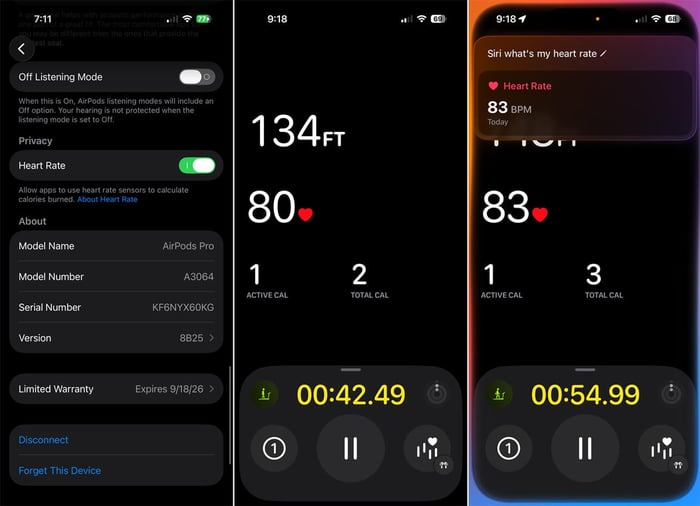
The AirPods Pro 3 are no ordinary earbuds—they track your pulse! Just pop them in or open the case, enable the feature in Bluetooth settings, and your pulse will sync with your Apple Watch's Workout app or the Fitness app on your iPhone.
Want a quick pulse check? Just ask Siri: “Hey Siri, what’s my heart rate?”
5. Hearing Health Features That Truly Protect
AirPods Pro 2 and 3 take hearing protection seriously with three key options:
Hearing Test
Run a quick audio test via Bluetooth settings where a series of beeps plays in each ear. Results pop up right there, letting you check your hearing sharpness—something I do regularly because, hey, hearing can decline over time.

Hearing Aid Mode
You can turn your AirPods Pro into a hearing aid by enabling “Hearing Assistance” and picking a sound profile, either from the test results or a new setup. Through Control Center, toggle different modes like “Background Sounds,” “Hearing Assistance,” and “Live Listen” to find what boosts ambient noise best.
Loud Sound Protection
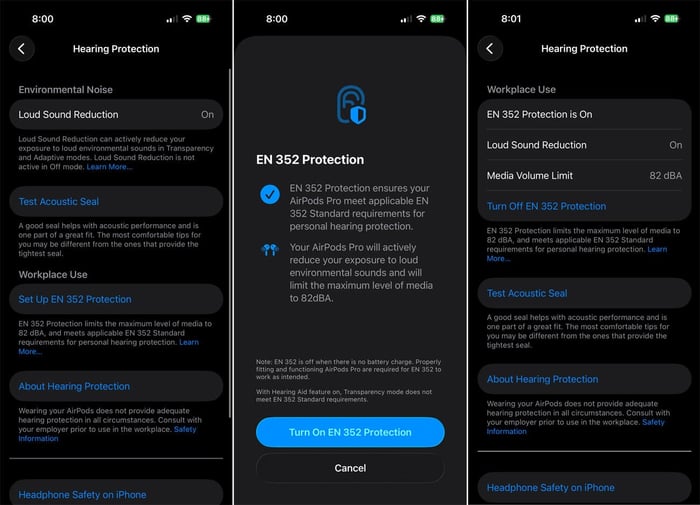
An automatic feature lowers loud volumes to safe levels. For extra safety, you can enable “EN 352 Protection” designed originally for noisy workplaces, but perfect for any constant loud environment to guard your ears.
Beyond these standout benefits, AirPods Pro also bring active noise cancellation, Transparency mode, adaptive sound, and live translation. Honestly, just switching to the comfy in-ear design was enough for me to ditch my old buds for good.
I fixed a mistake I regret ever making—sticking to the originals.
“AirPods Pro 3 are nearly impossible to repair, so take care of them like the treasures they are.”
- What makes AirPods Pro fit better than classic AirPods?
The in-ear silicone tips create a secure seal, preventing slipping and enhancing sound quality. - Can I test different ear tips with my Pro earbuds?
Yes, use the built-in Ear Tip Fit Test on your iPhone’s Bluetooth settings to find your perfect fit. - Do AirPods Pro let me control volume without my phone?
Absolutely! Swipe up or down on the earbud stem to adjust volume directly. - Is heart rate monitoring accurate on AirPods Pro 3?
It’s reliable for workouts, syncing data seamlessly with Apple’s Fitness and Watch apps. - How do AirPods Pro protect my hearing?
They offer hearing tests, hearing aid modes, and automatic loud sound reduction features.
Ready to celebrate your audio obsession? Elevate your space with a favorite album cover poster—shop our curated collection at Architeg Prints and bring music magic to your walls.
 | DISCOUNTGET 30% OFF*Use code on your next order:
|
* This post may contain affiliate links, meaning we earn a commission if you make a purchase through these links, at no additional cost to you.